


Creating a successful podcast involves more than sitting down in front of a microphone once a week. You need to research topics, coordinate with guests, record episodes, edit the footage, publish the content, and promote it across multiple platforms.
For busy business owners and creators, completing that process every week can quickly become overwhelming.
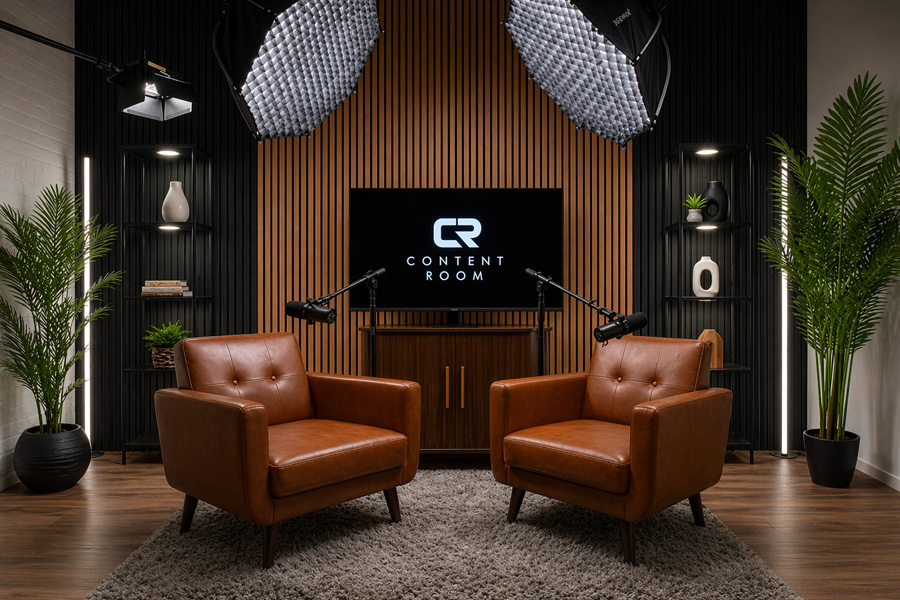
One solution is to organize a dedicated content day at a professional Podcast Studio in Nashville. Instead of recording only one piece of content, you can use a single studio session to produce podcast episodes, interviews, YouTube videos, social media clips, and other marketing materials.
With the right preparation, one day of recording can provide enough content to support your brand for several weeks.
What Is a Content Day?
A content day is a scheduled block of time dedicated to producing several pieces of content in one session.
Rather than setting up your equipment, lights, cameras, and microphones multiple times throughout the month, you complete your recordings together. This approach is often called batch recording.
For example, a business owner could use one content day to record:
- Two or three podcast episodes
- Several short educational videos
- Customer question-and-answer clips
- A company introduction video
- Social media Reels or Shorts
- Promotional messages
- An online course lesson
- Interviews with employees or partners
The content does not have to be published immediately. Once the recordings are complete, they can be edited, scheduled, and released gradually.
Batch recording can make content creation more manageable because it separates the production process from the publishing process.
Why Nashville Businesses Need Consistent Content
Nashville is widely known for music and entertainment, but its business community includes companies from many different industries.
The Nashville Area Chamber of Commerce describes the region as a diverse business ecosystem that includes music, healthcare, technology, professional services, hospitality, education, and other growing sectors.
Businesses in these industries need ways to demonstrate their knowledge and build trust with potential customers. Podcasting allows them to discuss important subjects in more detail than a short advertisement or social media caption.
A local business could create episodes that answer customer questions, explain its services, interview industry experts, or discuss trends affecting the Nashville community.
These conversations can help potential customers understand the people and experience behind the business.
Choose the Main Goal of Your Content Day
Before booking a studio, decide what you want to accomplish.
Trying to record a podcast, an online course, a company video, ten advertisements, and dozens of social clips in one session may create unnecessary pressure. Your content day should have one main purpose supported by several smaller goals.
Possible primary goals include:
Launching a New Podcast
You may want to record your trailer and first three episodes before publishing the show. Having several completed episodes provides a buffer and makes it easier to maintain a regular release schedule.
Building a Video Library
A business may want to create short videos that answer its most common customer questions. These videos can be published on the company website, YouTube channel, and social media accounts.
Interviewing Local Experts
A host could invite several Nashville-area professionals to participate in separate conversations throughout the day.
Recording a Course
Coaches, consultants, educators, and subject-matter experts can record lessons for an online program or private training library.
Producing Social Media Content
Some sessions may focus primarily on short vertical videos for Instagram Reels, YouTube Shorts, TikTok, and other platforms.
Choosing your primary goal will help you decide how much studio time you need and what type of preparation is required.
Select the Right Recording Environment
The recording space affects both the technical quality of your content and the comfort of your guests.
A professional studio can provide controlled lighting, clearer sound, reliable recording equipment, and a setting designed for on-camera conversations. This reduces the risk of background noise, distracting visuals, poor microphone placement, or inconsistent lighting.
Content Room Studios offers a professional recording space in Westhaven, Franklin, serving creators, brands, and businesses from Franklin, Brentwood, Williamson County, and the greater Nashville area.
Creators can review the studio and its equipment before scheduling a session. The available setup includes professional podcast microphones, headphones, multiple 4K cameras, video switching equipment, studio lighting, monitors, teleprompter tools, and configurable seating arrangements.
This allows the recording environment to be adapted for interviews, solo presentations, table discussions, educational videos, and other content formats.
Create a Recording Schedule
A content day needs a clear schedule. Without one, too much time may be spent deciding what to record next.
Start by estimating how long each piece of content will take.
A basic schedule could look like this:
- 30 minutes for arrival and preparation
- 60 minutes for the first podcast episode
- 15 minutes for a break and set adjustment
- 60 minutes for the second podcast episode
- 30 minutes for lunch
- 60 minutes for short educational videos
- 30 minutes for promotional clips
- 30 minutes for additional takes and closing content
Include breaks between long recordings. Talking continuously for several hours can affect your energy, voice, posture, and ability to stay focused.
You should also leave extra time for introductions, guest changes, equipment adjustments, and retakes.
Prepare Your Topics Before Arriving
Your studio session should be used for recording, not deciding what to discuss.
Create a list of topics in advance and organize them according to importance. Each podcast episode or video should have one clear purpose.
For a podcast episode, prepare:
- A working title
- The main question or subject
- Three to five discussion points
- Guest information
- Supporting examples or statistics
- A short introduction
- A closing message
- A call to action
You do not need to write every sentence unless you prefer a fully scripted format. A flexible outline often creates a more natural conversation while helping the host stay on topic.
Spotify for Creators provides additional guidance on writing a podcast script, including how creators can structure introductions, transitions, main sections, and closing messages.
Send Guests Clear Instructions
Guest preparation can determine whether an interview begins on time.
Send each guest the studio location, arrival time, expected recording length, parking information, discussion topic, and basic clothing guidance.
Ask guests to avoid clothing or accessories that may create unwanted noise. Large jewelry, loose bracelets, or materials that rub against a microphone can sometimes affect a recording.
Guests should also know whether the episode will include video. Someone expecting an audio-only conversation may prepare differently than someone appearing in a full video production.
Content Room Studios provides practical information about appointments, remote guests, equipment, file delivery, and production assistance on its studio FAQ page.
Plan for Both Audio and Video
Even when your main product is an audio podcast, recording video can provide more opportunities to promote the episode.
A video podcast can be published on YouTube while the audio version is distributed through podcast platforms. Specific sections can then become short videos for social media.
YouTube allows creators to organize eligible videos into podcasts through YouTube Studio. A complete video episode can therefore support both podcast discovery and the creator’s broader YouTube strategy.
Before your session, decide whether you need:
- A full-length video episode
- Individual camera angles
- Horizontal promotional videos
- Vertical social media clips
- Behind-the-scenes footage
- Guest photographs
- Custom introductions
- Sponsor messages
Making these decisions early allows the studio team to prepare the correct recording setup.
Record Short Clips Separately
Strong moments from a full podcast can be turned into social media clips, but you should not rely entirely on finding usable sections later.
Reserve part of your session for short, direct videos created specifically for social media.
These could include:
- One useful business tip
- A common myth about your industry
- An answer to a customer question
- A brief explanation of your service
- A reaction to an industry trend
- A key lesson from the podcast
- An invitation to watch the full episode
Each clip should focus on one idea. Avoid including a long introduction before reaching the main point.
You can also record several versions of your call to action. One version might direct viewers to the complete podcast, while another encourages them to visit your website or schedule a consultation.
Bring Extra Clothing Options
Recording several episodes in one session is efficient, but publishing them weeks apart can make the batch-recording process obvious.
Bringing an extra jacket, shirt, or accessory allows you to create a slightly different appearance for each episode. You may also be able to change the seating arrangement, background elements, screen graphics, or lighting between recordings.
The goal is not to hide the fact that you created content efficiently. Small visual changes simply give each episode its own identity.
Make the Most of Professional Support
Operating microphones, cameras, lights, recording software, and video switchers can distract a host from the conversation.
A professionally supported session allows you to concentrate on the guest and the subject being discussed.
Content Room Studios includes an engineer during recording sessions to assist with setup, recording, and file delivery. The studio also offers optional editing and production services, allowing creators to choose how much of the post-production process they want to manage themselves.
This can be especially valuable during a busy content day. Instead of checking equipment after every segment, the host can review the outline and prepare for the next recording.
Consider an Ongoing Production Plan
A single content day can help launch a campaign, but long-term audience growth usually requires consistency.
Businesses that plan to release content regularly should create a repeatable schedule. That might mean recording once a month, twice a month, or once every quarter, depending on the number of episodes produced during each session.
Content Room Studios offers content production memberships that can include studio time, fully produced video podcast episodes, editing, episode publishing, show notes, thumbnails, and vertical social media clips.
A recurring arrangement may help businesses avoid starting the planning and production process from the beginning every month.
Create a Post-Recording Workflow
Recording is only one part of the content process.
Before your studio day, decide who will be responsible for:
- Reviewing the recorded files
- Editing complete episodes
- Creating social media clips
- Writing episode titles
- Preparing descriptions and show notes
- Designing thumbnails
- Uploading episodes
- Scheduling social posts
- Responding to audience comments
- Reviewing performance data
Create folders for every episode and use consistent file names. A basic folder might contain the complete recording, separate audio files, camera footage, promotional clips, thumbnails, show notes, and approved final exports.
An organized system makes it easier to find and reuse content later.
Measure the Results
After publishing your content, review how the audience responds.
Useful measurements may include:
- Complete episode views
- Audio downloads
- Average viewing duration
- Audience retention
- Social media engagement
- Website visits
- Email subscriptions
- Contact form submissions
- Consultation requests
Do not judge the entire project based on one episode. Some topics may attract more interest than others, and it may take time to learn what your audience values most.
Use the results to improve the subjects, episode length, titles, introductions, and promotional clips included in your next content day.
Find a Podcast Studio Serving the Nashville Area
A productive content day can help businesses and creators produce more material without allowing content creation to take over their entire schedule.
The key is preparation. Choose your goals, organize your topics, coordinate with guests, build a realistic recording schedule, and plan how each recording will be edited and published.
For creators searching for a professional Podcast Studio in Nashville, Content Room Studios provides a nearby option in Franklin with professional audio and video equipment, configurable studio setups, technical assistance, and production services for clients across Middle Tennessee.
You can contact Content Room Studios to discuss your production needs or book your studio time online.
Guest post provided by Franklin Marketing Co..